目录
Tuya 6-Way Power Controller
Rail type multifunctional power control host
Function Overview
6-channel relay (ZIGBEE/WIFI optional), can communicate with gateway or cloud to control power to various peripheral devices. Suitable for controlling light switches, electric screen lifting, electric curtain opening/closing, and providing power control for projectors, cameras, conference systems and other equipment.
The panel provides manual buttons and LED status indicators, supporting channel on/off control via body buttons. LED indicators show the current working status of each channel.
Key Features
- Total of 6 channels, each channel is a 16A relay.
- The status of the 6-channel switch can be displayed by the panel LED indicator lights.
- By using panel button switches, individual channel switching functions can be achieved.
- Provide a special node control interface (linked with hotel card insertion and power retrieval/energy-saving modules).
- Provide 6 independent node control interfaces (K1~K6), which can be connected to external buttons or the central control system to perform separate switch operations on channel switches.
- Provide three power outage recovery modes:
- Power Off Mode
- Power On Mode
- Memory Mode
- Two antenna versions available: Built-in antenna / External antenna.
Button & Interface Description
Panel Section
| Item | Description |
| —— | ————- |
| RST LED | Flashes when device enters distribution network state |
| Channel LEDs (1~6) | Solid ON when channel is on; OFF when channel is off |
| Buttons 1~6 | Press to toggle the corresponding relay on/off state |
| Distribution Network Button | For pairing with gateway/cloud |
| POW LED | Power status indicator |
Interface Part - Power & Output
The 6-way power controller provides:
- Power input terminals: L/N/PE
- 6 channel outputs (L1~L6): Each supports max 16A
- K1~K6 external input interface: Can be connected to external switches or central control systems
- RS485 interface: For communication with central control or smart home systems
- DIY custom input interface
Power Outage Recovery Modes
- Power Off Mode: All channels remain OFF after power recovery
- Power On Mode: All channels turn ON after power recovery
- Memory Mode: Each channel restores to its state before power outage
Installation & Wiring
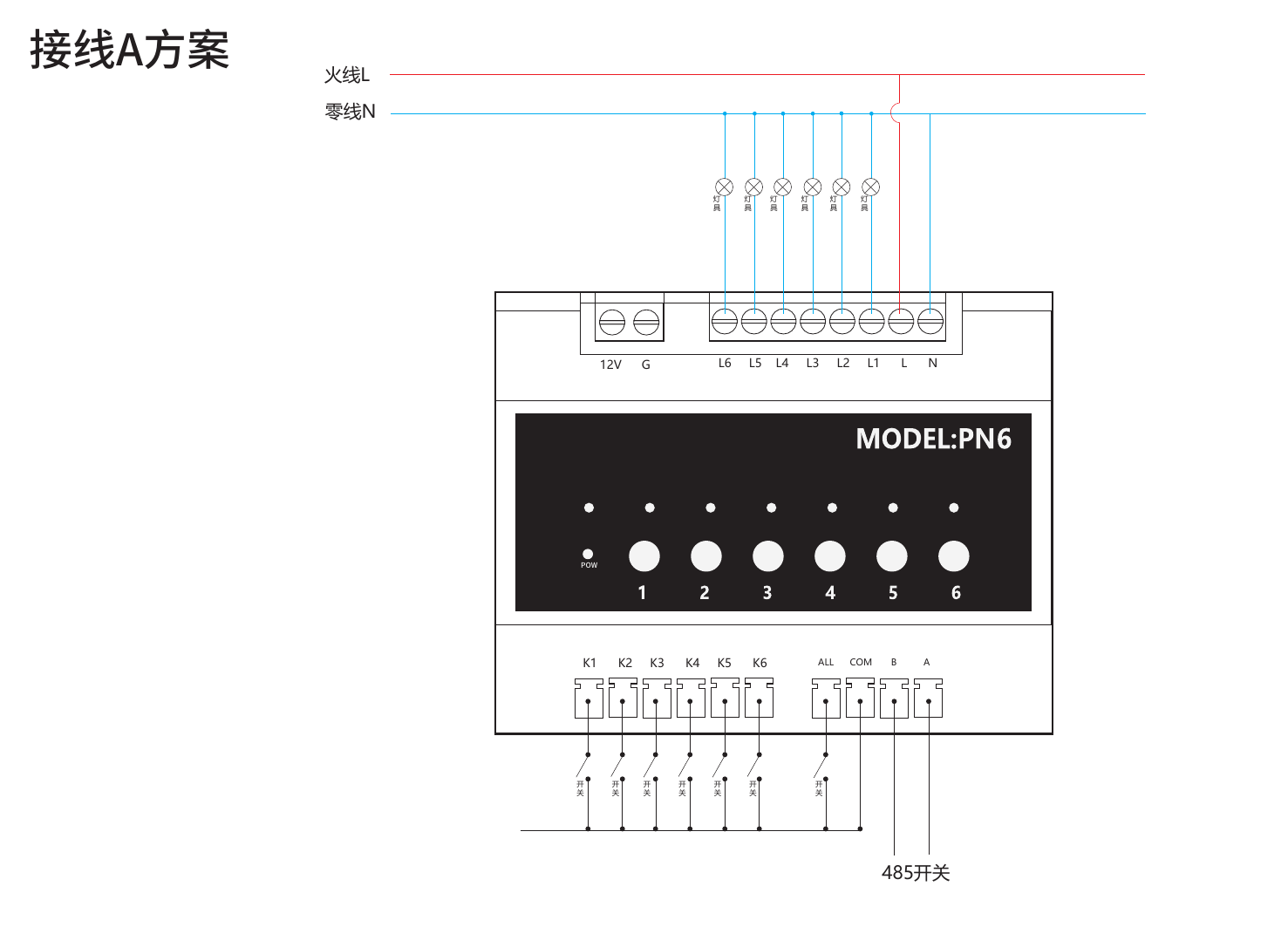
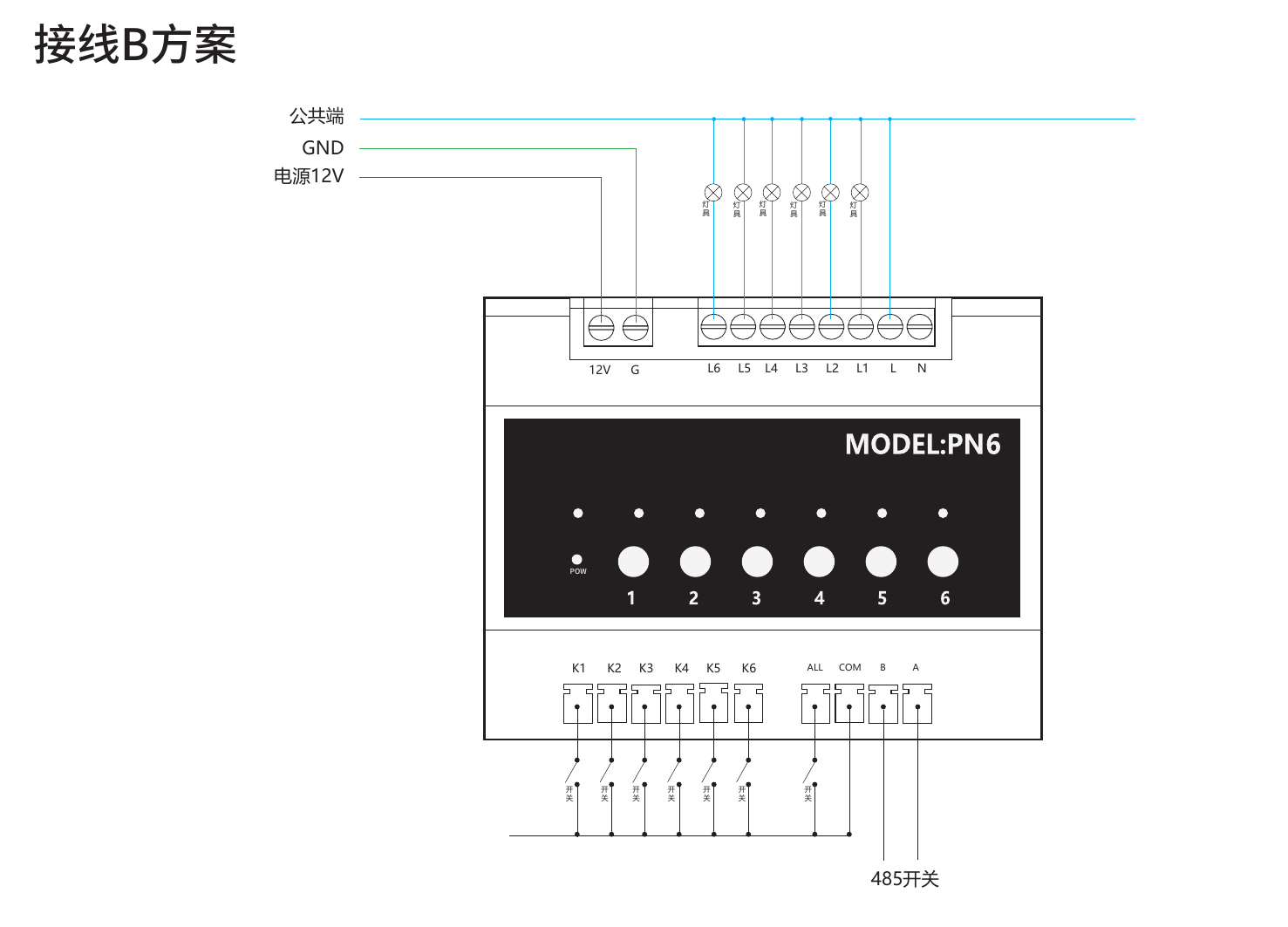
Refer to the wiring diagrams below for proper installation:
Wiring Scheme A (AC 220V):
- Input: L/N/PE
- Output: L1~L6 connected to loads (lamps, appliances, etc.)
- K1~K6: External switch inputs
- ALL: Master switch
- RS485: A/B for communication
Wiring Scheme B (DC 12V):
- Input: GND + 12V
- L as common terminal
- L1~L6: Output terminals
Tuya Smart App Pairing
1. Power on the device.
2. Press and hold the distribution network button until the RST LED flashes.
3. Open Tuya Smart App, click "+" → "Add Device".
4. Select the corresponding product category and follow the App instructions to complete pairing.
Specifications
| Item | Parameter |
| —— | ———– |
| Input Voltage | AC 90~250V |
| Max Load per Channel | 16A |
| Relay Life | ≥ 100,000 times |
| Communication | ZigBee / Wi-Fi (optional) |
| Operating Temperature | -20°C ~ 60°C |
| Humidity | 5% ~ 95% RH (non-condensing) |
| Dimensions | 145 × 90 × 40 mm |
| Installation | DIN rail mounting |

